Messenger app only working on WiFi?

I’m a huge fan of the Telegram Messenger. I’ve been using it for a couple of months now and it’s nothing short of amazing. I have it installed in almost every device I use. I kept trying to get Randy and Chanux to switch to using it and even managed to finally get Chanux to set it up on his android but I don’t see him using it much. Randy kept disappointing me as he usually does these days and simply refused to try it (he also refused to watch Star Wars, so yes, my dear Internet, I think we can safely give up on the guy now).

Never_seen_Star_Wars

Anyways I didn’t really write this blog post only to talk about Randy and his awful tastes. About a week ago I noticed that Telegram stopped working in the background while on mobile data and only started working while I’m connected to WiFi. This was really annoying because more than a couple of times I missed all my messages while on the road only to realize that Telegram was offline during my travels. When I get back on WiFi Telegram would notify me about all the messages that I didn’t receive during the day.

This obviously looked like a problem with my data settings that would restrict Telegram from using any mobile data and to my surprise it was all set to normal. Then I thought it was a restriction from the Power saving mode in android and that was also not the case.

A quick search on google led me to a bunch of forums that showed this is not just a problem with Telegram but also happens to be a problem common to a lot of apps that uses background data. And none of them seem to have solved the issue.

I kept looking through the threads and found one suggestion that finally worked for me. It was to reset all app preferences in android. This looked crazy at first but after trying everything I gave up and just did it, and guess what! Telegram now works well on mobile broadband.

So if your messenger app is not working and nothing else works you can do the following:

Go to Settings -> Applications -> Applications manager

Select Reset app preferences from the “MORE” menu and you’re done.
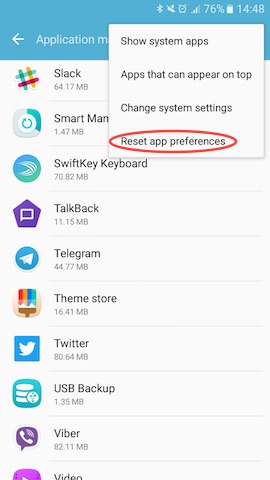
reset_app_preferences_android

Be warned though. This would reset the preferences for all the apps in your android phone. So only do this if nothing else works for you.

This trick should also fix apps like Slack, Snapchat, Viber or any other app not working on mobile data.

~SeeJay
Make blogging great again!

So yeah, I’m tired of not having a proper place to post my rants. And I certainly don’t think I’m accomplishing anything by posting stuff on Facebook (Twitter, I’m still in love with, but there’s only so much you can do with 140 characters).

So a few months back I decided to blame Blogger for my laziness and switched to something better. I went with Pelican because it was written in Python and also it was really good. But after a few weeks, I realized that having all those moving parts (Static site generators, how ironic!) really gets in the way and you end up managing the site rather than posting anything. And I decided that I needed to get back to the one true blog platform!

And today I’m rocking a super cool WordPress installation on my blog. I imported all the content from the old Blogger site and fixed the URL structure. I’ll be hunting for a good theme in the next few days and hopefully keep this blog up to date again, just like the old days.

~SeeJay

Welcome to User Centric!

U-S-E-R(This is the post I wrote introducing UserCentric on the official blog at blog.u-s-e-r.com)

Hey all! Welcome to the first official post on the UserCentric blog! So… what’s UserCentric all about??? Glad you asked!

You know those little complaints or ideas we toss out on social networks like Twitter or Facebook about the stuff we use—only to watch them vanish into thin air? Yep, we’ve all been there! UserCentric is the spot where you can share those micro-reviews, and unlike regular social media, your user experience feedback gets neatly sorted with #Tags.

So, how’s it different from traditional product review sites? Three words: Ease of use! Most of us don’t have time to write long-winded reviews about the things we use. But we’re all posting quick takes on social media anyway—griping about product flaws or throwing out ideas for features we’d love to see. Why not gather all those micro-reviews in one place where others can actually benefit from our tips? That’s exactly why I created UserCentric.

We needed something that makes reviewing products fun and painless! That’s why I built UserCentric the way it is. Just start your review with the product name as a #tag—that’s it.

Review anything you use, one point at a time… Becoming a semi-pro product reviewer has never been this easy! 😀

Check out my reviews page on UserCentric at http://u-s-e-r.com/seejay to see how tidy UX reviews can look.

We’re in private beta right now, so if you want to snag your favorite username early, use the beta code KyXnrTz on the signup page. Just keep it hush-hush! 😉

~SeeJay

Don’t mess with my Internet!

sobrave The coolest thing about the internet? It’s ours! all of us, No matter who you are or where you’re from, we’ve all got the freedom to steer it where we want. But now, the U.S. Congress is messing with that, pushing laws that could wreck the internet’s core setup. Tech giants like Wikipedia, Mozilla, Reddit, Google, and tons more who actually give a damn about protecting the internet are fighting back. But of course, there’s a pack of greedy politicians gunning for these laws, all to prop up a few groups who’d rather trash the internet than fix their outdated business models. That’s straight-up evil, and we’ve got to hit back hard! That’s why everyone who cares about keeping the internet free needs to spread the word and get people clued in to fight the Stop Online Piracy Act (SOPA) and the Protect Intellectual Property Act (PIPA). If either of these passes, it’s game over for the internet as we know it. Don’t let anyone screw with your internet! Jump into the fight against SOPA/PIPA. Read more at: SOPA Strike SOPA FAQ Tim O’Reilly interview What Experts think InfoGraphic (Picture courtesy of reddit)

How Dropbox Won

A couple of days ago, I stumbled across something really cool that Dave Winer shared on Twitter. It was a link to the application Drew Houston, Dropbox’s founder, submitted to Y Combinator for their Summer 2007 cycle. I clicked it out of curiosity and found it super interesting and thought-provoking. Here’s the answer from the app to the question: What is your company going to make?”

“Dropbox synchronizes files across your/your team’s computers. It’s much better than uploading or email, because it’s automatic, integrated into Windows, and fits into the way you already work. There’s also a web interface, and the files are securely backed up to Amazon S3. Dropbox is kind of like taking the best elements of subversion, trac and rsync and making them ‘just work’ for the average individual or team. Hackers have access to these tools, but normal people don’t…”

Right when I read this, it hit me how clearly Drew saw his product’s future before anyone else even had a clue. He knew exactly what Dropbox was and how it’d solve the problem he was targeting. Looking at Dropbox’s success today, it’s obvious he nailed his plan. That’s a winning combo right there. I’d be shocked if a product flopped when its founder had this kind of vision. I bet Paul Graham was grinning ear to ear when he saw this one. Here’s what ran through his head when he reviewed Dropbox’s Y Combinator app that summer…

125 points by pg 452 days ago | link

What happens when I read this:

File syncing. Superset of backups, which people will pay for. Good. Single founder. Bad. But at least he’s looking for more people. Went to MIT, 1600 SAT. Probably fairly smart. Wrote a poker bot. Now I’m starting to get interested; has the right attitude. Description of the software sounds plausible but generic. Maybe it’s good, but who can tell. But little sister uses it; that’s impressive. Scroll down to what he understands that competitors don’t get. Wow: very concise and unequivocal. I’m now basically sold. Scroll through the rest. No red flags. Did not make the usual joke single founders make when asked how long the founders have known one another. Good answer to what might go wrong. A-. (Would be an A with a cofounder.)

Pretty fascinating stuff. PG definitely knows a killer idea, and a sharp mind, when he sees one.
The application’s packed with great questions like What do you understand about your business that other companies in it just don’t get?” and killer answers from Drew. It’s a must-read if you’re into startups, and I’d totally recommend answering these questions yourself for any project you’re working on.
Oh, and by the way, if you haven’t tried Dropbox yet, trust me, you’re missing out big time.
~SeeJay