I was watching a random "Day in the life of" video from @lexfridman from 3 years ago and saw that he has the @kinesisergo Advantage2 Keyboard. I actually wanted that a long time back but had forgotten about it. Wondering if I should just pull the trigger… 🤔
I had been drooling over this so many years ago (like back in 2015) but just gave up because it was way over my budget for a keyboard in the first place, and the horrendous shipping and import fees would only make it even worse.
I eventually forgot about it, and fast forward 7 or 8 years, here I am, playing around on the computer while watching a Lex Fridman video from some time back, and this showed up! I went and checked it out on Amazon again, and guess what? It was available! (it still comes at a cost, as is the case with all the pretty things in life…. but at least it’s available!!)
I went back on YouTube in search of some reviews on the device but came across this other short video that pretty much sealed the deal for me.
For those of you too lazy to watch the YouTube clip, it’s from a discussion Lex had with none other than Guido van Rossum, where he explains how much he likes this keyboard.
So I did the only sensible thing one could do and went ahead and ordered it.
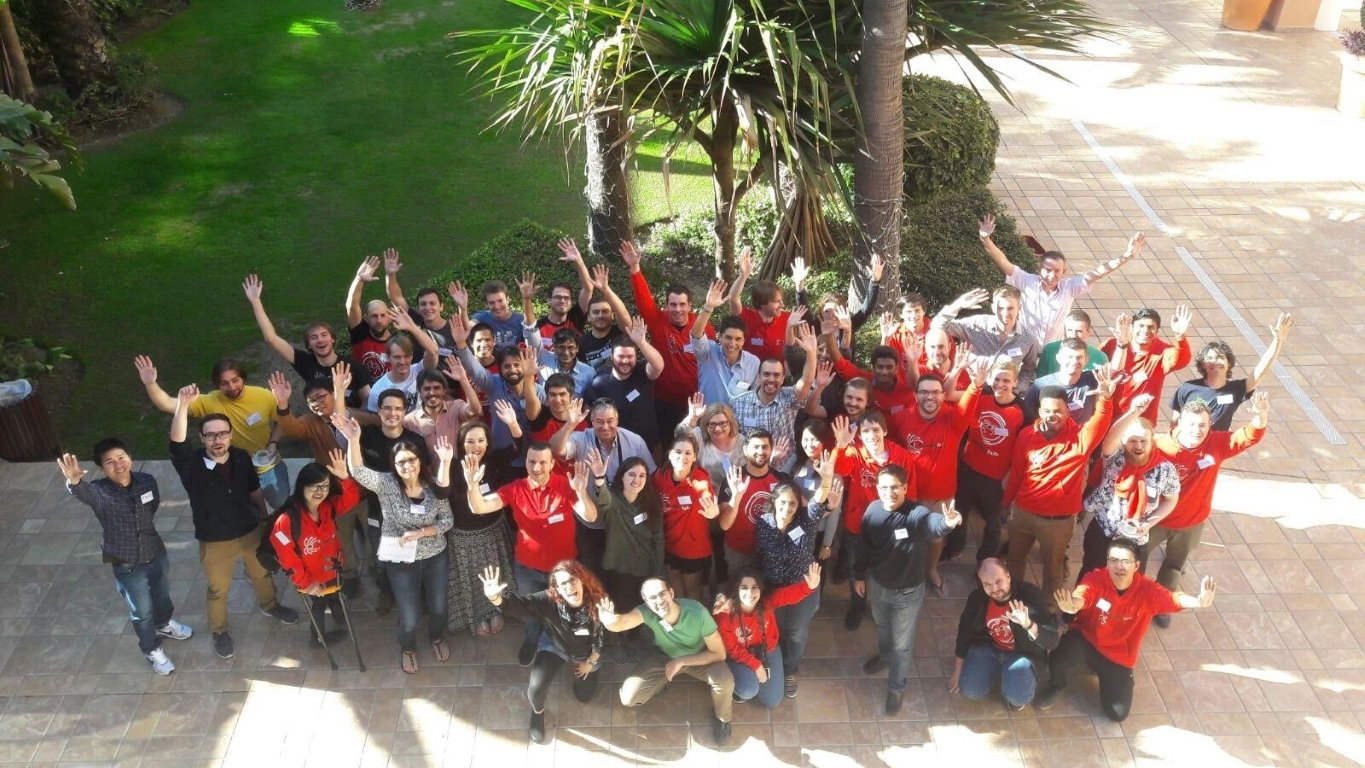
Yes, you read it right! After almost 3 years of working together totally remote, I finally got to meet my awesome colleagues at Scrapinghub back in November 2017 when we had our first ever company get together in Estepona, Spain.
Estepona Sunrises are to die for.
So my flight was around 10:30 pm and I was driven to the airport by my little sister two hours before. She has staff access there and knows everybody so I got the total VIP treatment and the whole process was super comfortable for me. (Of course It did help that I had all the documents in proper order, as airport security is no joke, no matter how important of a person you are :D)
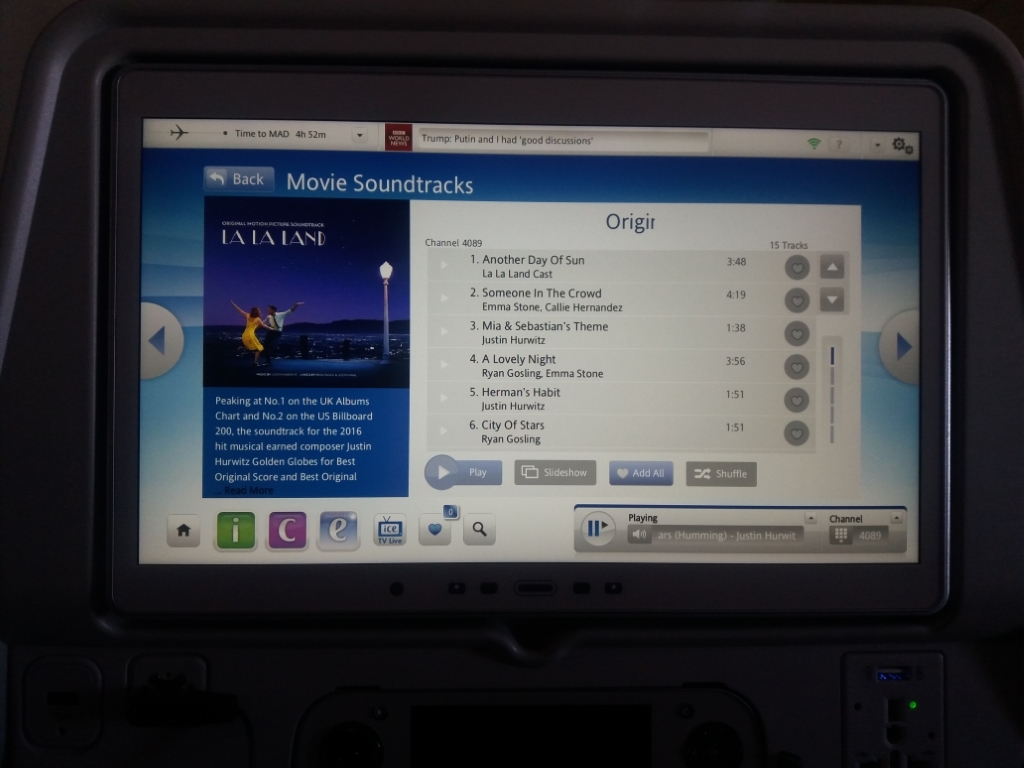
City of stars forever!
I was just about to step outside of the window for some fresh air when I saw the warning sign =)
I was driven from Malaga airport to Estepona by this wonderful gentleman with a BMW… BMW’s are somewhat of an elite vehicle in Sri Lanka and I had not been in one until this so I was pretty thrilled to have that experience. It was a comfortable drive; took about 45 minutes to the hotel.
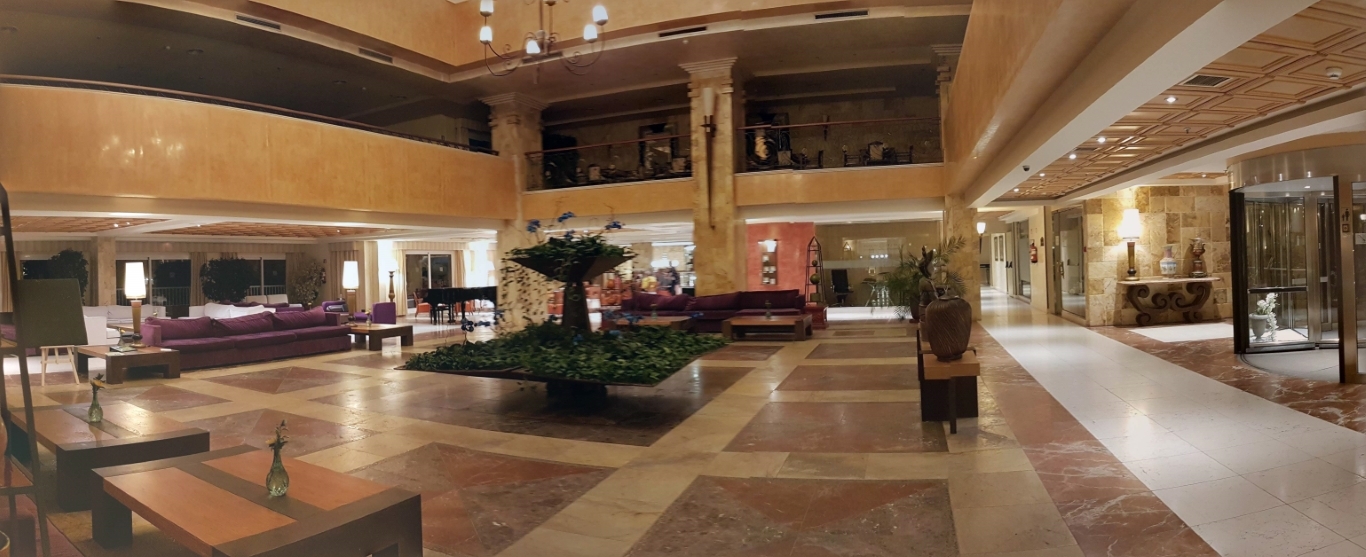
Finally we came to Elba Estepona! It looked just as magnificent as I imagined!
Main entrance was this really cool rotating door which kept the inside of the hotel away from the cold air outside.
To be continued…
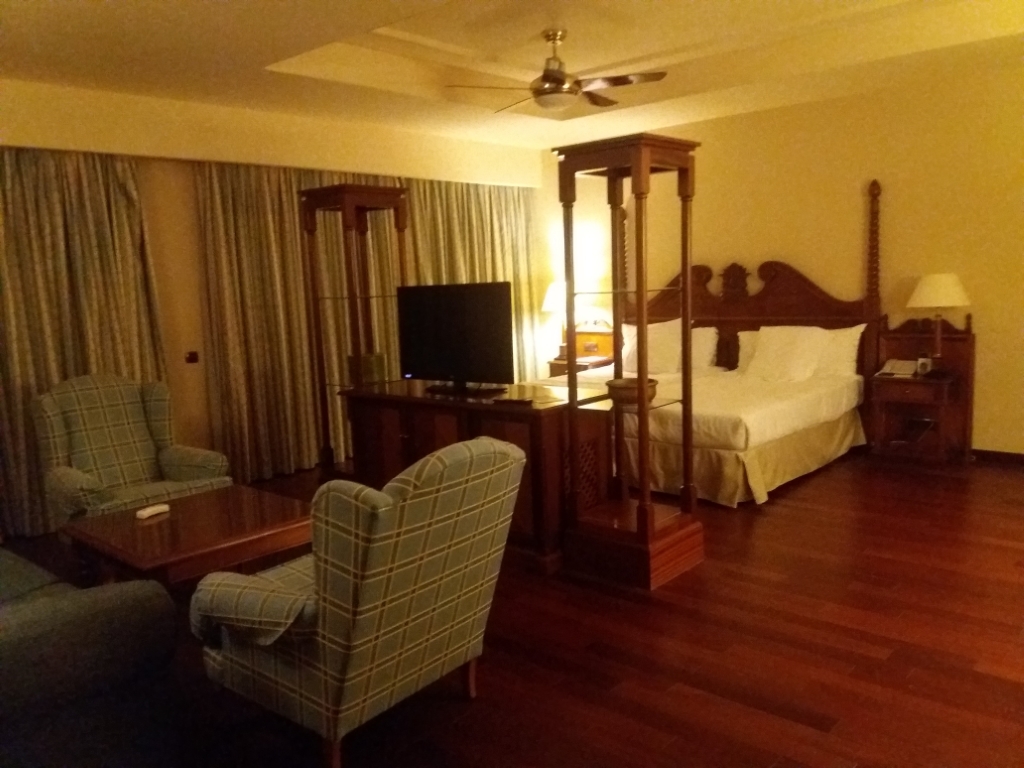
As I came out of the hotel, my ride to the airport arrived and the chauffeur put all my luggage into the back of the vehicle. I turned around and took one last look at the magnificent main entrance of the Gran Hotel Elba Estepona, where I had both the most wonderful time with awesome people and also indulged in the luxuries of solitude and quiet with a view that is absolutely out of this world, and whispered to myself “Until next time!”
And then I jumped into the vehicle that was going to take me back to the airport, This time, another Sri Lankas’s favorite, a Mercedes…
I’m kinda embarrassed to admit this, but this is the best time I’ve managed to track so far.
One of the most useful things for me with the Xiaomi Mi Band is the sleep tracker. I check my sleep data pretty much every morning, and it helps me figure out if I got enough rest the night before and what to do if when I haven’t.
I’ve known for a long time that I usually don’t get enough sleep at night, and I’m not exactly proud of it. I find it way easier to focus at night because it’s so peaceful and calm. While some of you “early to bed, early to rise” folks might not get this, I’m sure the night owls out there totally do.
But whatever your sleep style is, we can all agree on one thing: not getting enough sleep comes with some serious health risks. Seriously, Google it right now! You’ll find tons of research showing how bad sleep deprivation can be. I was gonna link some articles I’ve read about this before, but googling them floodedmewitha bunchmore. I skimmed a couple, and it freaked me out so much that instead of finishing this post last night around midnight, I went straight to bed!
Anyway, I’ve been tracking my sleep for a few weeks now, and I know I need to step it up. Don’t get me wrong, I always knew I wasn’t getting enough sleep, I just didn’t have the hard numbers… or maybe I was too lazy to actually track it. That’s why the Mi Band’s so helpful, it does all the work for me. Now I know I usually get between 3 to 5 hours a night, around 3 if I stay up too late, and just over 5 if I hit the sack a bit “early.”
Now that I’ve got a clear picture of how much sleep I’m getting and what I need to fix, it’s one less thing to stress about. And honestly, if you saw my numbers, you’d see I don’t have that much to tweak. Since I work from home all the time, I can sleep whenever I want and wake up whenever I feel like it. Some of you who have to get up early to commute might think it’s tougher for you to fix your sleep, trust me, it’s not! I’d argue it’s actually harder for me ‘cause I don’t have that nudge to stick to a set schedule. I end up staying up too late and, for some weird reason, waking up earlier than I should.
My point? Whether you can pick your wake-up time or not, there’s almost always a way to carve out enough sleep (and if there isn’t, you need to rethink what you’re doing, because you’re probably better off alive). I’ve been slacking on this for way too long, but I’m set on changing that now.
So how do we pull this off? Easy! track your daily sleep habits and adjust accordingly. Sort out your schedule ‘til you’re getting at least 6 hours (maybe 7, depending on how you feel). I totally recommend grabbing a sleep tracker. Because it’s been a game-changer for me. I tried some Android apps a while back, but they didn’t cut it. I don’t like keeping my phone that close to me in bed, and I’m not even sure how accurate they are. So, get a real sleep tracker (I mean, $20+ for a shot at better health is a steal =) ).
Once you know how much sleep you’re getting (or how little, if you’re like me), figure out how much more you need for a healthy amount and set up a schedule.
And most importantly, stick to that sleep schedule like your life depends on it. ‘cause it probably does!
I’m a huge fan of the Telegram Messenger. I’ve been using it for a couple of months now and it’s nothing short of amazing. I have it installed in almost every device I use. I kept trying to get Randy and Chanux to switch to using it and even managed to finally get Chanux to set it up on his android but I don’t see him using it much. Randy kept disappointing me as he usually does these days and simply refused to try it (he also refused to watch Star Wars, so yes, my dear Internet, I think we can safely give up on the guy now).
Anyways I didn’t really write this blog post only to talk about Randy and his awful tastes. About a week ago I noticed that Telegram stopped working in the background while on mobile data and only started working while I’m connected to WiFi. This was really annoying because more than a couple of times I missed all my messages while on the road only to realize that Telegram was offline during my travels. When I get back on WiFi Telegram would notify me about all the messages that I didn’t receive during the day.
This obviously looked like a problem with my data settings that would restrict Telegram from using any mobile data and to my surprise it was all set to normal. Then I thought it was a restriction from the Power saving mode in android and that was also not the case.
A quick search on google led me to a bunch of forums that showed this is not just a problem with Telegram but also happens to be a problem common to a lot of apps that uses background data. And none of them seem to have solved the issue.
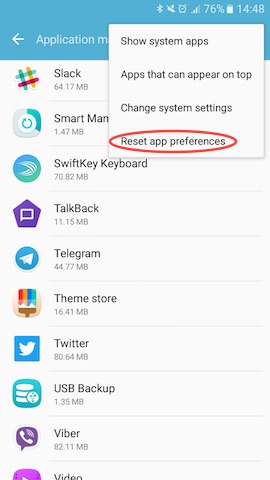
I kept looking through the threads and found one suggestion that finally worked for me. It was to reset all app preferences in android. This looked crazy at first but after trying everything I gave up and just did it, and guess what! Telegram now works well on mobile broadband.
So if your messenger app is not working and nothing else works you can do the following:
Go to Settings -> Applications -> Applications manager
Select Reset app preferences from the “MORE” menu and you’re done.
Be warned though. This would reset the preferences for all the apps in your android phone. So only do this if nothing else works for you.
This trick should also fix apps like Slack, Snapchat, Viber or any other app not working on mobile data.
So yeah, I’m tired of not having a proper place to post my rants. And I certainly don’t think I’m accomplishing anything by posting stuff on Facebook (Twitter, I’m still in love with, but there’s only so much you can do with 140 characters).
So a few months back I decided to blame Blogger for my laziness and switched to something better. I went with Pelican because it was written in Python and also it was really good. But after a few weeks, I realized that having all those moving parts (Static site generators, how ironic!) really gets in the way and you end up managing the site rather than posting anything. And I decided that I needed to get back to the one true blog platform!
And today I’m rocking a super cool WordPress installation on my blog. I imported all the content from the old Blogger site and fixed the URL structure. I’ll be hunting for a good theme in the next few days and hopefully keep this blog up to date again, just like the old days.
Hey all! Welcome to the first official post on the UserCentric blog! So… what’s UserCentric all about??? Glad you asked!
You know those little complaints or ideas we toss out on social networks like Twitter or Facebook about the stuff we use—only to watch them vanish into thin air? Yep, we’ve all been there! UserCentric is the spot where you can share those micro-reviews, and unlike regular social media, your user experience feedback gets neatly sorted with #Tags.
So, how’s it different from traditional product review sites? Three words: Ease of use! Most of us don’t have time to write long-winded reviews about the things we use. But we’re all posting quick takes on social media anyway—griping about product flaws or throwing out ideas for features we’d love to see. Why not gather all those micro-reviews in one place where others can actually benefit from our tips? That’s exactly why I created UserCentric.
We needed something that makes reviewing products fun and painless! That’s why I built UserCentric the way it is. Just start your review with the product name as a #tag—that’s it.
Review anything you use, one point at a time… Becoming a semi-pro product reviewer has never been this easy! 😀
Check out my reviews page on UserCentric at http://u-s-e-r.com/seejay to see how tidy UX reviews can look.
We’re in private beta right now, so if you want to snag your favorite username early, use the beta code “KyXnrTz“ on the signup page. Just keep it hush-hush! 😉
The coolest thing about the internet? It’s ours! all of us, No matter who you are or where you’re from, we’ve all got the freedom to steer it where we want. But now, the U.S. Congress is messing with that, pushing laws that could wreck the internet’s core setup. Tech giants like Wikipedia, Mozilla, Reddit, Google, and tons more who actually give a damn about protecting the internet are fighting back. But of course, there’s a pack of greedy politicians gunning for these laws, all to prop up a few groups who’d rather trash the internet than fix their outdated business models. That’s straight-up evil, and we’ve got to hit back hard! That’s why everyone who cares about keeping the internet free needs to spread the word and get people clued in to fight the Stop Online Piracy Act (SOPA) and the Protect Intellectual Property Act (PIPA). If either of these passes, it’s game over for the internet as we know it. Don’t let anyone screw with your internet! Jump into the fight against SOPA/PIPA. Read more at: SOPA StrikeSOPA FAQTim O’Reilly interviewWhat Experts thinkInfoGraphic(Picture courtesy of reddit)
So I had this idea for a small (I guess) project that uses a Digg-like voting system. I started with the Pligg CMS and messed around with it for a bit, but after two days, I decided to switch to its well-known Drupal-based rival, Drigg. Don’t get me wrong, Pligg’s a solid CMS, and I’m not saying folks should steer clear of it. But for me, it felt a bit too cluttered. 😐
What bugged me about Pligg? The code’s not super clean, you’ve got to tweak a dozen spots just to do something basic like swap a theme. The development’s not as lively as Drupal’s, which has a huge, active dev community. The karma calculation isn’t very transparent, which could be a real pain later. And the user support? It’s “known” for not really listening to feedback 😛 (though I didn’t run into that myself).
So, I jumped to Drigg, and I’m happy I did 🙂 It’s built on Drupal, and you can feel how tidy the code is. Sure, if you go for a manual install, it takes a bit to set up the modules and get Drigg running. You’ll need some Drupal basics too, but it’s honestly kinda fun to figure out, even if you’re totally new to Drupal, it’s not that tough to pick up.
Right now, I’m tinkering with the site, and I might write a post about setting up Drupal+Drigg if I find the time. Oh, and yeah, I’ll spill the beans on this project I’m working on 😛 If you’re into Free Software, you might actually dig it, heehee. But we’ll see how it goes… 😉








 (This is the post I wrote introducing
  The coolest thing about the internet? It’s ours! all of us, No matter who you are or where you’re from, we’ve all got the freedom to steer it where we want. But now, the U.S. Congress is messing with that, pushing laws that could wreck the internet’s core setup. Tech giants like Wikipedia, Mozilla, Reddit, Google, and tons more who actually give a damn about protecting the internet are fighting back. But of course, there’s a pack of greedy politicians gunning for these laws, all to prop up a few groups who’d rather trash the internet than fix their outdated business models. That’s straight-up evil, and we’ve got to hit back hard! That’s why everyone who cares about keeping the internet free needs to spread the word and get people clued in to fight the Stop Online Piracy Act (SOPA) and the Protect Intellectual Property Act (PIPA). If either of these passes, it’s game over for the internet as we know it. Don’t let anyone screw with your internet! Jump into the fight against SOPA/PIPA. Read more at:
  SeeJay Online!