I’m a huge fan of the Telegram Messenger. I’ve been using it for a couple of months now and it’s nothing short of amazing. I have it installed in almost every device I use. I kept trying to get Randy and Chanux to switch to using it and even managed to finally get Chanux to set it up on his android but I don’t see him using it much. Randy kept disappointing me as he usually does these days and simply refused to try it (he also refused to watch Star Wars, so yes, my dear Internet, I think we can safely give up on the guy now).

Anyways I didn’t really write this blog post only to talk about Randy and his awful tastes. About a week ago I noticed that Telegram stopped working in the background while on mobile data and only started working while I’m connected to WiFi. This was really annoying because more than a couple of times I missed all my messages while on the road only to realize that Telegram was offline during my travels. When I get back on WiFi Telegram would notify me about all the messages that I didn’t receive during the day.
This obviously looked like a problem with my data settings that would restrict Telegram from using any mobile data and to my surprise it was all set to normal. Then I thought it was a restriction from the Power saving mode in android and that was also not the case.
A quick search on google led me to a bunch of forums that showed this is not just a problem with Telegram but also happens to be a problem common to a lot of apps that uses background data. And none of them seem to have solved the issue.
I kept looking through the threads and found one suggestion that finally worked for me. It was to reset all app preferences in android. This looked crazy at first but after trying everything I gave up and just did it, and guess what! Telegram now works well on mobile broadband.
So if your messenger app is not working and nothing else works you can do the following:
Go to Settings -> Applications -> Applications manager
Select Reset app preferences from the “MORE” menu and you’re done.
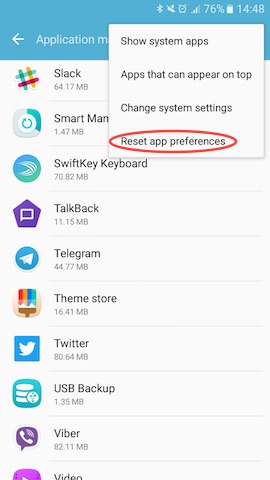
Be warned though. This would reset the preferences for all the apps in your android phone. So only do this if nothing else works for you.
This trick should also fix apps like Slack, Snapchat, Viber or any other app not working on mobile data.
~SeeJay
 (This is the post I wrote introducing
  The coolest thing about the internet? It’s ours! all of us, No matter who you are or where you’re from, we’ve all got the freedom to steer it where we want. But now, the U.S. Congress is messing with that, pushing laws that could wreck the internet’s core setup. Tech giants like Wikipedia, Mozilla, Reddit, Google, and tons more who actually give a damn about protecting the internet are fighting back. But of course, there’s a pack of greedy politicians gunning for these laws, all to prop up a few groups who’d rather trash the internet than fix their outdated business models. That’s straight-up evil, and we’ve got to hit back hard! That’s why everyone who cares about keeping the internet free needs to spread the word and get people clued in to fight the Stop Online Piracy Act (SOPA) and the Protect Intellectual Property Act (PIPA). If either of these passes, it’s game over for the internet as we know it. Don’t let anyone screw with your internet! Jump into the fight against SOPA/PIPA. Read more at:
  SeeJay Online!